




Step-by-step action plan to transform a traditional real estate agency into a digitalized business. Includes checklist, timeline, and mistakes to avoid.
Digitalizing your real estate agency can feel overwhelming. So many tools, so many changes, so much to learn… Where do you even start?
This guide gives you a concrete 90-day plan to transform your operation without losing a single sale in the process.
Before Starting: The Initial Diagnosis
Before touching anything, you need to know where you stand.
Current Situation Checklist
Answer these questions:
Property Management
- Where do you store your property information? (Excel, paper, software…)
- How long does it take to list a new property?
- How often do you have outdated information?
Client Management
- Where do you record leads and their follow-up?
- How many leads do you estimate you lose per month?
- How long does it take on average to respond to a new lead?
Operations
- How do you coordinate viewings?
- How do you communicate with property owners?
- How many hours do you dedicate to administrative tasks?
Data
- Do you have performance metrics for your team?
- Do you know which portals generate the best quality leads?
- Can you predict your revenue for next month?
Calculate Your “Digital Maturity Score”
| Area | Score |
|---|---|
| Everything on paper or basic Excel | 1 point |
| Some disconnected digital tools | 2 points |
| Partial digital system (CRM or management, not both) | 3 points |
| Integrated but basic system | 4 points |
| Complete system with automations | 5 points |
- 5-10 points: You need complete transformation
- 11-15 points: You need integration and automation
- 16-20 points: You need advanced optimization
- 21-25 points: You’re already a digital leader (are you sure you need this guide?)
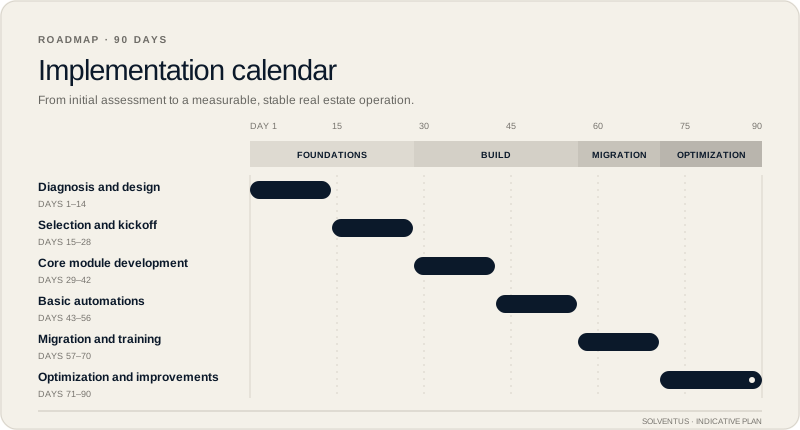
Phase 1: Foundations (Days 1-30)
Objective: Centralize information and eliminate chaos.
Week 1-2: Definition and Design
Tasks:
-
Map all current processes
- What steps do you follow from capturing a property to selling it?
- What steps do you follow from receiving a lead to closing?
- Identify bottlenecks and duplications
-
Define system requirements
- List essential functionalities
- List desirable functionalities
- List necessary integrations (portals, email, calendar…)
-
Involve the team
- Meet with each agent and ask: “What repetitive tasks do you hate?”
- Collect their ideas and concerns
- Generate commitment to change
Week 3-4: Selection and Kickoff
Tasks:
-
Evaluate software options
- Generic software (Salesforce, HubSpot) → More economical, less adapted
- Standard real estate software → Balanced, may lack customization
- Custom software → Higher initial investment, maximum adaptation
-
Make the decision
- Based on budget, needs, and growth projection
- Don’t choose by price alone; choose by value
-
Start development/configuration
- If custom: Kick-off with the development team
- If standard: Start configuration and customization
Phase 1 Deliverables:
- Current processes document
- Prioritized requirements list
- Provider selected
- Project started
Phase 2: Building the System (Days 31-60)
Objective: Have the system running with core functionalities.
Week 5-6: Core Module Development
Priority modules (in this order):
1. Property database
- Complete profile: features, photos, documents, status
- Custom fields according to your operation
- Change history
2. Client/lead database
- Contact details and preferences
- Lead source
- Interaction history
3. Property-client linking
- Manual and automatic matching
- Properties viewed and feedback
- Relationship status
Week 7-8: Basic Automations
Automations to implement:
Multi-channel publishing
- Connection with Zillow, Realtor.com, MLS (minimum)
- Automatic sync of changes
- Auto-unpublish when sold/reserved
Automatic communications
- Welcome email for new leads
- Viewing confirmations
- Pre-viewing reminders
Internal alerts
- Lead not contacted in X days
- Property without viewings in X weeks
- Listing agreement about to expire
Phase 2 Deliverables:
- Functional system with basic data
- Automatic publishing operational
- Automatic communications configured
- Alerts working
Phase 3: Migration and Adoption (Days 61-75)
Objective: Move from the old system to the new one without losing information or productivity.
Week 9-10: Data Migration
Migration process:
-
Inventory of existing data
- Active properties (high priority)
- Clients/leads from the last year (high priority)
- Property history (medium priority)
- Old client history (low priority)
-
Data cleanup
- Remove duplicates
- Complete empty fields
- Standardize formats
-
Phased import
- Day 1: Active properties
- Day 2-3: Active leads and clients
- Day 4-5: Relevant history
Week 11: Team Training
Training plan:
| Session | Duration | Content |
|---|---|---|
| Session 1 | 2h | Overview and navigation |
| Session 2 | 2h | Property management |
| Session 3 | 2h | Client management and follow-up |
| Session 4 | 2h | Automations and viewing coordination |
| Session 5 | 1h | Reports and analytics |
| Practice | 1 week | Supervised use with support |
Keys for good adoption:
- Train in small groups (2-3 people)
- Record sessions for later reference
- Designate an internal “champion” who resolves minor questions
- Celebrate small victories
Phase 3 Deliverables:
- Data migrated and verified
- Team trained
- System in daily use
- Support channel established
Phase 4: Optimization (Days 76-90)
Objective: Fine-tune the system based on real use and maximize adoption.
Week 12: Adjustments and Improvements
After 2 weeks of real use, gather feedback:
Questions for the team:
- What’s working really well?
- What’s confusing or slow?
- What do you miss?
- What would you do differently?
Typical adjustments:
- Simplify forms with too many fields
- Add shortcuts for frequent actions
- Modify alerts (too frequent or not useful)
- Improve reports according to real needs
Week 13: Additional Functionalities
With the core working, add:
Owner portal (if not included)
- View of their property status
- View statistics
- Viewing feedback
Improved viewing coordination
- Calendar with property availability
- Online booking for clients
- Route optimization for agents
Advanced dashboards
- Performance by agent
- Conversion by lead source
- Sales pipeline
Phase 4 Deliverables:
- System adjusted according to feedback
- Additional functionalities operational
- Adoption > 80% of team
- Improvement metrics documented
Visual 90-Day Calendar
Common Mistakes to Avoid
Mistake 1: Trying to Do Everything at Once
Problem: Implementing 15 functionalities at once confuses the team. Solution: Start with the essentials. Add layers gradually.
Mistake 2: Not Involving the Team
Problem: Imposed system that nobody wants to use. Solution: Participation from day 1. Their ideas improve the outcome.
Mistake 3: Underestimating Training
Problem: “It’s intuitive, they’ll learn.” Solution: Invest in proper training. ROI depends on usage.
Mistake 4: Migrating Dirty Data
Problem: The new system inherits the chaos from the old one. Solution: Clean before migrating. It’s easier than cleaning afterward.
Mistake 5: Abandoning After Implementation
Problem: The system becomes obsolete without maintenance. Solution: Plan continuous improvements and support.
Mistake 6: Choosing Price Over Value
Problem: Cheap software that doesn’t solve the problem. Solution: Evaluate total cost (including time lost with bad tools).
Metrics to Measure Success
At 90 days you should see improvements in:
| Metric | Minimum Target |
|---|---|
| Time to publish property | -60% |
| Leads with proper follow-up | +40% |
| Lead response time | -70% |
| Owners with weekly report | 100% |
| Hours in admin tasks per agent | -50% |
Estimated Investment
For a real estate agency with 3-5 agents:
| Concept | Range |
|---|---|
| Custom software | $27,000 - $44,000 |
| Training | $2,200 - $4,400 |
| Data migration | $1,600 - $3,300 |
| Total | $30,800 - $51,700 |
Annual maintenance: 10-15% of initial investment
Typical payback: 2-4 months
Final Implementation Checklist
Pre-implementation
- Current processes documented
- Requirements defined and prioritized
- Team informed and committed
- Budget approved
During implementation
- Weekly follow-up meetings
- Testing before each deployment
- Configuration documentation
- Active contingency plan
Post-implementation
- Complete training conducted
- Data migrated and verified
- System in productive use
- Support channel established
- Continuous improvement plan
The Day After Day 90
Digitalization doesn’t end. Day 91 begins the maturity phase:
- Months 4-6: Consolidation and continuous optimization
- Months 7-12: Add advanced functionalities (AI, analytics)
- Year 2+: Integration with new market technologies
Ready to Start Your Transformation?
If you found this guide useful but want professional help to execute it, we’re here.
We offer a free planning session where:
- We evaluate your current situation
- We identify your specific priorities
- We design a personalized 90-day roadmap
- We estimate investment and expected return
No commitment. If you prefer to do it on your own with this guide, great. If you want expert support, that works too.
Have questions about any step in the process? Write to us at info@solventussoftware.com and we’ll help.